Wednesday, July 06, 2011

Easier Screen Shots In OS X: Make the keyboard shortcuts F5 & F6

I don't know why I didn't think of this sooner.

It's kind of an open secret that taking screenshots by default in OS X Snow Leopard and now OS X Lion is not as obvious as it should be. All iOS devices have an easier screenshot gesture (tap the home + lock button for a second) than OS X does. Take a look at the screenshot below:

OS X Lion Default Screen Shots Keyboard Shortcuts

3 or 4 keys to trigger a screenshot! It's always been a tricky combination to remember for experienced OS X users, and when you tell Windows converts that their precious Print Screen key has been replaced by 3 & 4 button combos, they almost always say how is this easier

The answer of course is that it's not and never has been. It's more powerful, in OS X you get to draw a box around the part of the screen you want, but it's a hard sell. I usually just tell somehow to launch Grab.

After I installed the OS X Lion GM tonight, I was looking through System Preferences to see what had changed, and I was disappointed to see the default keyboard shortcuts for screen shots hadn't changed. So I started wondering what keys I could map screenshots to, and then it hit me:

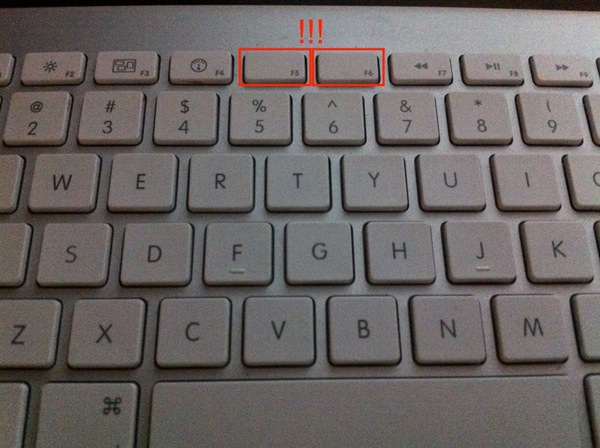
Apple Bluetooth Keyboard

F5 and F6 are unmapped to critical operating system functionally, they're blank guys on my Apple Wireless Keyboad!!!

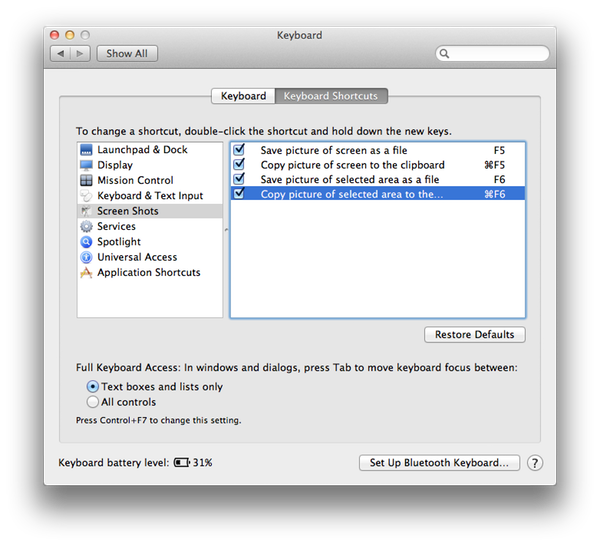
I couldn't believe I hadn't thought of this before, or that Apple hadn't already done it. Maybe they just don't think taking screenshots is a common user activity in OS X, but it seems like everybody needs to take screenshots at some point, why not make it easy? So I changed my keyboard shortcuts to this:

OS X Lion New Screen Shots Keyboard Shortcuts

One caveat, F5 was already mapped to VoiceOver, so I put that on ⌥⌘F5 since I never use it.

I'll file a bug with Apple to propose getting these made the default keyboard shortcuts for screenshots, and put some kind of icon on the actual keyboard keys.

Tuesday, July 05, 2011

The Reason Why an Objective-C Protocol Doesn't Implement respondsToSelector:

I've been having a lot of fun with Objective-C protocols lately. In one of the projects I'm on, I've been working to eliminate warnings from the compiler. One of those warnings is that respondsToSelector: isn't found in your delegate or data source. When working with a delegate or data source, two different naming conventions for Objective-C protocols, a typical pattern your code follows is to see if your delegate or data source actually implements a method defined in your protocol, like this:
- (void)notifyDelegateOfButtonTap
{
    if (self.delegate &&
       [self.delegate respondsToSelector:@selector(protocolSampleViewController:didTapButton:)])
    {
        [self.delegate protocolSampleViewController:self didTapButton:self.button];
    }
}
The protocol definition would typically look like this when implementing this pattern:
@protocol ProtocolSampleViewControllerDelegate
@optional
- (void)protocolSampleViewController:(ProtocolSampleViewController *)protocolSampleViewController didTapButton:(UIButton *)button;
@end
This is a typical protocol definition as code completed in Xcode 3.x, with the addition of @optional just to maintain pattern correctness for the example. In Xcode 4.x, the code completed @protocol definition template looks like this:
@protocol protocol name <NSObject>
methods
@end
As you might have guessed by now, the <NSObject> added behind the protocol name is the key. That's because it's actually the NSObject protocol that defines most of the core methods that the NSObject class implements, including respondsToSelector:

Once you make sure all your protocol definitions adopt the <NSObject> protocol, then calling respondsToSelector: on your delegate or datasource variables won't result in compiler warnings.

One more thing...you could cast your delegate or data source variable to id like this:
...
[(id)self.delegate respondsToSelector:@selector(protocolSampleViewController:didTapButton:)]
...
That is an ugly solution and doesn't help you understand another key feature of protocols, inheritance, which I plan to cover in an upcoming post.

Tuesday, June 28, 2011

Adopting an Objective-C Protocol Privately in the Implementation File

I continue to be surprised by the syntactic constructions allowed in Objective-C and the Coca/Cocoa Touch frameworks for iOS and Mac OS X.

iTimeZone for iOS, my world clock calculator app, has relied on the UIDatePicker control since it first shipped on July 15, 2008. The results haven't always been optimal. I've filed any number of bugs with Apple documenting how the control can get confused and show the wrong date & time. Sometimes they've been fixed, other times, like now, it takes such a long time it really reflects negatively on my app.

I've finally had it with this control. I've started reimplementing UIDatePicker as TGDatePicker. My goal is to be API compatible and eventually release this as an open source project so others can benefit.

So of course I started by looking at the UIDatePicker.h header in the iOS 4.3 SDK. The docs state and the header shows UIDatePicker manages a private UIPickerView to show its UI. But UIPickerView uses delegate and data source protocols to configure itself, but they're not adopted in the public header!

UIKIT_CLASS_AVAILABLE(2_0) @interface UIDatePicker : UIControl <NSCoding>
{
...
}
...
@end

I've never adopted a protocol outside of the header before, and I wanted to be as close in my implementation as possible to UIDatePicker, so the only other thing I could thing of is to adopt the protocols in the implementation file, like this:

#import "TGDatePicker.h"

@interface TGDatePicker () <UIPickerViewDataSource>

@end

@implementation TGDatePicker
...
@end

And it works! I can't think of a reason why Apple wanted to do this. It doesn't seem like adopted protocols are top secret information. I probably won't ever use this outside of this special case, but now I know just in case.

Sunday, June 05, 2011

WWDC 2011 App Doesn't Save Favorites Offline

Having been on a project for months where the question of what to do when the app is offline came up on a near daily basis, I find it amusing I can't save favorites in the WWDC 2011 app without an Internet connection:

Friday, May 27, 2011

Icon & App Name Evolution of SleepMute for Mac OS X

SleepMute for Mac OS X, the utility that automatically mutes and unmutes your Macs sound, is nearly two months old now, and I've finally got some time to write about it. One of the big differences for Tangerine Element on this project was hiring a professional icon designer. I had done all the icon work on iTimeZone for iOS, and it didn't turn out to bad. My graphics skills hit the wall early on that part of the project and it was a hard slow climb up the hill to ship what I did.

Get It Started
I find that to keep motivated when working on my own apps, I have to have a good idea of what the icon will be. I started with the following image that I cobbled together from desktop wallpaper and my take on the Mac OS X speaker icon on the menu bar:
Since this is a Mac app, having good quality icons at 16x16 all the way up to 1024x1024 (I'm future proofing) was more than a match for my feeble skills with a bitmap editor.

Having this temp image though was like writing an application definition statement. I had a very clear idea and intentionally limited the scope for 1.0. The only problem was I had the wrong name!

Google-Fu Failure
When I started work on SleepMute, the app was actually named IdleMute. Before I wrote a line of code, I bought the freely available idlemute.com. Who ships an app today without buying the domain?!? Once I owned idlemute.com, I wrote code and tested willy nilly and didn't think about it again. I was seconds from sending the first email to the icon designer (more on him in a second) detailing what IdleMute 1.0 was and what I wanted in the icon when I did another search for the name and boom, similar functionality apps on other platforms came falling out of the woodwork. Clearly my googling skills failed to reveal these apps when I first started the project. In the end, I am much happier with SleepMute than IdleMute. IdleMute was what I defaulted to as a developer, and really matched Windows terminology, which still depressingly pops out of my head sometimes. SleepMute more nicely aligns with Apple's terminology shown to users.

The Professional
I was on a real tight timeline to ship SleepMute before work on another project got crazy, so finding an icon designer that could start immediately was a key factor. After looking around for a while, I found Andrea Austoni.

Andrea was great to work with. I gave him my prototype logo and provided the following direction:

What I was going for what something in what appears to be Apple's new template for Mac apps as shown with the Mac App Store icon. rounded circle border, minimal 3D, easily convertible into pure 2D if needed. For the SleepMute icon, I was trying to take the muted speaker in the Mac OS X menubar to draw that visual connection to muted sound in OS X. Then having Zs coming out of the speaker, common iconography for something sleeping, was supposed to show you know a sleeping speaker. My plan was to scale up or down the Zs, at 32, I had 2. I put them on a night sky background because I didn't want just a black background.
Armed with that information, he created this sketch:
Sketches

I loved that Andrea created concepts I hadn't even thought of before. We narrowed the sketches down to 3 to take to the next level:
Refined Concepts My wife, Andrea, and I all agreed that number 2 was the way to go. It solved the problem of having a natural circle border which follows Apple's latest Mac OS X icons, and it has more graphical punch, especially once we started putting colors on it:

I selected the lighter orange one which matched the Tangerine Element company colors better, then we made design tweaks.

Final

The main change from the earlier concept was the switch of the far outer and riveted rings for better contrast in a number of situations throughout Mac OS X.

Conclusion
Andrea has his own blog post about our experience working together, with a hint to showing icons correctly in Mac OS X 10.6 Snow Leopard. I enjoyed the process so much and the results, Andrea is working on an icon redesign for iTimeZone for iOS

Wednesday, May 25, 2011

How Not To Advertise Fake iPads By Staples

My wife recently decided she needed a new hobby, so she started couponing. This means quickly acquiring these things called "newspapers" on Sunday made from dead tree parts and butchering them with sharp tools into tiny squares that you hand over to someone at a physical store. For this ritual sacrifice, they take money off the price of their goods. I know right, sounds so archaic, but at least it wasn't knitting!

Anyway, in the stack of coupon leaflets there was an ad created by Staples to sell fake iPads. Here is it in all it's "glory":

Staples Ad
Click/tap for bigger version

Let's take this apart:

  1. Adobe Flash enabled for a true Web experience...of frustratingly choppy video, browser crashes, and unplayable games.
  2. Run multiple programs for true multi-tasking...Tablets run Apps, this isn't Windows. How do I download programs for my Tablet?!?
  3. Front- and rear-facing cameras let you stay connected...When did Front gain a trailing dash? So the WiFi doesn't get us "connected"? How does a connection over a camera work?
  4. Play movies, music and games on the go...Isn't this like when advertising a new car saying "comes with tires".

Other observations & questions from a regular buyer's perspective:

  • Why is 7" Playbook more expensive then the Acer 10.1"?
  • Who at Motorola thought putting WiFi in the XOOM logo was a good idea?
  • Playbook doesn't have Dual-core or Google?
  • Is Acer's tablet called the Acer or the fine print Acer Iconia Tab? Is there a soft drink tie-in?
  • Where's the weight and thickness of any of these tablets?
  • Does wirelessly syncing the Playbook with a Blackberry phone cost something?

All TOO easy!

Monday, May 23, 2011

From Snarky Truth to Reasoned Explanation: Gender Discrimination in the Tech Industry

I haven't followed all the reference links, but Faruk Ateş' From Snarky Truth to Reasoned Explanation is well worth the read about discrimination against women in technology in particular, but really in general. An excerpt:

"What we ultimately want is Formal equality: a world in which race, gender, ethnicity, orientation and religious beliefs do not affect the opportunities and treatment of any individual. Unfortunately, the only people who think we live in such a world (or work in an industry that enjoys Formal equality) are a certain class of people who have enjoyed privileges their entire lives. Many women, if you care to respectfully listen to them, will readily assure you that we do not live in such a world—or industry—at all."

One of the small things men in tech do, and probably everywhere, is refer to a group of their co-workers as guys when it includes women. I've been guilty of this in the past, a bad habit I finally broke a few years ago, and I've always believed in Formal equality for women. To any women that experienced my use of this term, please accept my apology. If you find yourself doing this, figure out how to eradicate this verbal tic from your speech.

Sunday, May 22, 2011

From the Grocery Store Line: Irony Lost

Clerk: How’re you doin’ today sir? Man: Good, the world's still here! Clerk: I know right, but I got a little nervous since the store was EMPTY last night. Man: Yeah well my church was FULL this morning.

Flash Hangs PS3 3.61

I updated to PS3 system software version 3.61, the first available after the massive data breach Sony suffered nearly a month ago.

Since the Playstation Network was still down for maintenance right after I updated, changed my password, and deleted my billing information (luckily, the credit card on file was already closed and expired, hackers lose!), I ended up using the embedded browser to read about the content of the 3.61 update on the PS3.

I agreed to run the plugin, which of course is Flash, and then clicked on the video for Ratchet & Clank: All 4 One. My son wanted to see it and we've played every Ratchet & Clank game on PS3. It started to play, but since I am watching on an HDTV, I clicked the HD button on the video toolbar and then this:

IMG 0649

HUNG! Seriously, does Adobe Flash work flawlessly on any OS?

Wednesday, May 11, 2011

Goodbye Stargate!

We've been together a long time & I'm sad to see you go. Like a star athlete that plays past their prime, it was your time to end. To many recycled plots and underdeveloped characters slowly leached the fun out of the franchise. Also, the easy humor on display in SG-1 was in short supply as Atlantis and Universe took over the reins.

We both know this isn't the end, what death in Hollywood & sci-fi is? Even as I type this, I'm sure an executive somewhere is figuring out how to squeeze more milk from the cash cow. Perhaps you'll get a grand rebirth ala the Star Trek movie? More likely, you'll be put on ice to let wounded fans recover and a new creative team take over for an eventual episodic rebirth.

I can't promise I'll be there for you, but I probably will. Your brand of showing humanity move into the stars while explaining all our myths as aliens with "...sufficiently advanced technology is indistinguishable from magic" has undeniable appeal to me.

Enjoy the R&R!