Sunday, January 26, 2025

Update: Apple's Communication When Your App Gets Delisted

When I posted End of Line: SleepMute for macOS is no longer for sale and removed SleepMute from sale, I didn't expect Apple would be say anything else about it.

Yesterday, Apple sent me this:

Apple when they remove an outdated app

Another grace period surprised me. Doesn't affect my decision, but if you need it that's good to know!


Sunday, December 15, 2024

End of Line: SleepMute for macOS is no longer for sale

With sadness & some relief, SleepMute for macOS has been removed from sale on the App Store. Since this is a eulogy, might as well lay out some final stats: 
  • The only AppKit app as Tangerine Element I ever released
    • When the site was rebuilt with Wordpress, I never put SleepMute on it
  • Last version: 1.1.1 released March 27, 2012. 
  • Unreleased version: 2.0 created February 18, 2016 on the App Store.
  • Final Rating: 3.8 ★★★★☆ on 16 Ratings
  • Since April 1, 2015 (which is "Lifetime" App Store Analytics):
    • Sales: 208 units
    • Price: $0.99
    • Revenue: $28
    • I definitely had more sales than that before 2015.
  • Final App Store listing screenshot:
SleepMute on the App Store

Why remove the app now?

I've been thinking about removing the app from sale for a long time. There were many reasons:
  • Very little time to work on the app since 1.1.1 was released, 🫢, over 12 years ago.
  • App was written in Objective-C using AppKit and even older C APIs. 
    • Not an easy codebase to jump into when working with Swift, SwiftUI, & UIKit during the day
  • Apple Sherlocked most of the functionality!
    • The only feature left was pausing/unpausing iTunes Apple Music when sound was muted/unmuted
    • macOS stopped leaking sound while asleep a while ago
    • Apple first removed the startup sound from Macs, then brought it back, and finally put a switch in System SettingsSound
macOS 15 Sound System Settings


I probably would've kept holding out hope that I'd find time (I had features planned!) indefinitely, but Apple forced my hand. On October 25, 2024 I received an email from App Store Connect's App Review team that said I had a new message: 
App Store Connect email about SleepMute

I'd expected something like this since Apple posted Clarifying criteria & new timing extension for App Store Improvements process on April 29, 2022. I'd also had a tab open for years to Benoit Pasquier's post When to remove your iOS app from the App Store which I'd found very thoughtful.

Still, I opened the message on App Store Connect a tad hopeful I had more time, but that flame was quickly put out when I saw the title App Store Improvement Notice. Time was truly up.

App Store Connect App Store Improvement Notice for SleepMute

What features were planned for SleepMute 2.0?

Mic Mute Hot Key

Ever use video conferencing software and while in a meeting, you mute yourself? Then you switch to another window and it's at that exact moment you get asked a question that you should answer quickly Everyone struggles to get back to the window and unmute that app, which wastes everyone's time. All the video conferencing apps do it slightly different too.

Wouldn't it be great if macOS had a way mute or unmute the active microphone while in any app?

I thought so too and was going to add this so SleepMute. With each macOS release, I expected Apple would add this feature to the menu bar Microphone icon with Standard or Voice Isolation. They haven't yet and thankfully there are some apps in the App Store that do.

Jason Snell @ Six Colors wrote that Mic Drop mutes your microphone everwhere

I tried it just today and it's nicely done. You have to trust an app like this because muting a video conference can't fail. I really like the ON AIR icon you can put in the menu bar.

Turns out there a lot of these since the last time I searched so take a look.


Sound Mixer

I can't believe macOS 15 still doesn't have a sound mixer. I wanted to do something simple to control the relative volume games to FaceTime or Discord which is a never ending challenge. Struggled with this so much when playing Baldur's Gate 3. 

Rogue Amoeba has been a leader in macOS sound related apps for as long as I've been using Mac apps. They've got a great app called SoundSource that does a comprehensive job. It's perhaps a tad more complicated than what I had in mind, but there's no denying they have the skills and the business to build a great app. I can't compete with that!

App Rename

If I added these features, surely SleepMute would have to be renamed. I was leaning toward Mutetation.

Did I accomplish what I wanted with SleepMute?

I made SleepMute to stop my Mac from waking up my infant son 14 years ago with random noise when our home iMac shared a room with him. It worked great and did what I needed it to do for a number of years. As he got older and we switched living arrangements, the iMac wasn't in his room. 

My need for the feature diminished and so did my desire to work on it. Ultimately, that's what I learned. Side projects are usually born from a personal need. Once no longer a concern for you, it's hard to keep driving yourself forward.

These days, I'd much rather explore Final Cut Pro to make videos for Travel by Marisa or explore visionOS apps so really that tells me retiring SleepMute is the right decision.

Saturday, February 01, 2020

Quit and Close Tab Confirmation for Safari on macOS

A few weeks ago, John Gruber posted Quit Confirmation for Safari on MacOS. I was inspired to make a few changes to Mr. Gruber's script and add a couple more.

Check out my AppleScripts GitHub repo for quit confirmation on Safari and Chrome as well as a tab close confirmation on Safari.

Thursday, February 15, 2018

Apple Glass Will Replace Dumb Glasses

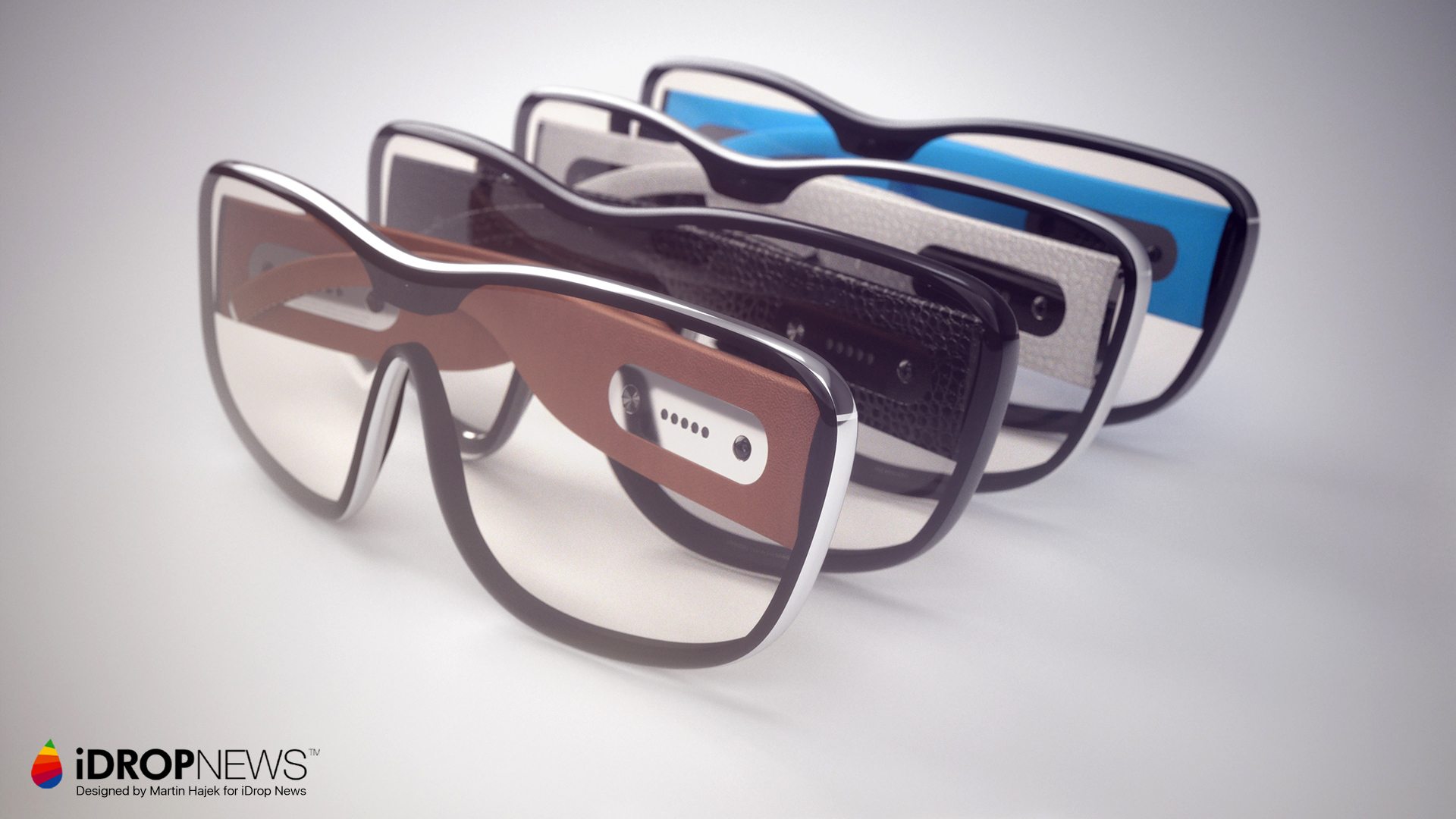
I’d never heard of iDropNews before today, but they have some beautiful renders of a potential Apple Augmented Reality (AR) product called Apple Glass:

They got me thinking. Let’s just say Apple is working on AR glasses for a launch in Fall 2020.

The biggest feature isn’t Augmented Reality…

It’s the Dumb Glasses market, stupid!

Any facial augmented reality solution is going to fail if they aren’t fashionable and are user hostile to spectacles, contacts, and sunglasses. Apple has more than likely come to the same conclusion after seeing the Google Glass debacle. A high level of fashion has to be baked into the product.

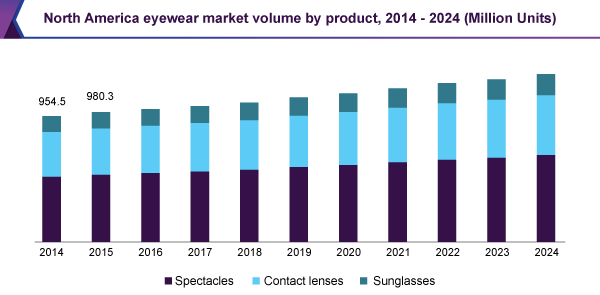
To maximize their market opportunity, Apple must be working on vision correction as a core feature. The market looks enormous. An estimate from Grand View Research says the worldwide eyewear market was $102.66B USD in 2015.

In North America, the majority of the eyewear market is spectacles:
 
If Apple is going to sell a lot of Glass (or whatever they’re called), they need to replace dumb spectacles. Is Apple going to make lenses custom lenses for this product? I don’t think so.

What I’d be betting on is that Apple will ship a product that has dynamically configured vision correction. This doesn’t mean optometrists go out of business, but instead of walking out of the office waiting for new glasses, they just send your new prescription to Apple Glass (and you get a copy in the Health app on iOS) and boom, you see at 20/20 or better again. Apple could also take a huge chunk out of Luxottica. This Snopes article has the best breakdown on truth and rumor about their market share I can find.

If you wear contacts, no problem, Apple Glass just turns off all corrections.

Wait, you also switch between indoor spectacles and sunglasses? No problem, Apple Glass darken like transitions (or better?).

That’s right, Apple Glass would also darken like transitions (but better?).

Apple Glass would also be compatible with contact wearers by turning off vision correction.
Need bifocals? No problem, Apple Glass can handle it.

The keynote practically writes itself…

WWDC 2020 - June 8

Tim: Today were announcing three products.

Tim: An Augmented Reality headset

Tim: Vision correcting glasses

Tim: Polarized sunglasses

Tim: …

Tim: Are you getting it yet? This isn’t three products, it’s one.

Tim: I’d like to show you Apple Glass
This would be the culmination of Tim Cook’s Apple. He’d be 60 years old, just shipped Apple’s most revolutionary product since the iPhone, and with plenty of time to pursue any other projects he wished.

Does Apple Glass cannibalize any other Apple products? Apple Watch shrinks a bit as some users that want Glass decide they don’t need Watch too. But if Apple Watch enhances the AR experience through arm motion tracking, Apple Glass could be purely additive.

Apple Glass complements iPhone for the foreseeable future due to processing power/battery life issues.

Update

I didn’t realize when I opened Seeking Alpha this morning it was about Apple’s AR opportunity.

Wednesday, November 22, 2017

Plan on using Face ID on iPhone X in your iOS app? You must include NSFaceIDUsageDescription in your Info.plist

I’ve already shipped an app that is accessing Face ID on iPhone X, but while testing an unrelated feature the other day, I saw the alert on the left. I thought I had read everything that I needed to about Face ID implementation, but this had slipped past me.


I parked it for a while, but I happened to open the docs on LAContext on an unrelated issue when I saw the Important information on the right.


When you click on NSFaceIDUsageDescription you see the description on the left. I didn't experience any forced app quitting behavior on device or simulator, but your experience may vary.


With NSFaceIDUsageDescription added to Info.plist, and a key of “Secure Account Access” like in the right screenshot, users will see a prompt like the one on the right when the app tries to access Face ID the first time.


Glad I caught this in the “one to fix all the iPhone X issues” release of the app I’m working on.

Sunday, October 01, 2017

How I was Accidentally Credited by Apple on a macOS Security Update

curl

We would like to acknowledge Dave Murdock of Tangerine Element for their assistance.

That’s from the end of About the security content of macOS Sierra 10.12.6, Security Update 2017-003 El Capitan, and Security Update 2017-003 Yosemite.

I wasn’t aiming to obtain such credit, all I did was File a Radar on curl.

Why?

I have no end of trouble downloading Cocoapods, Ruby Gems, Node modules, using Terminal at my day job.

They have a proxy server connected to my Active Directory credentials. For GUI based apps, macOS combined with a little Apple utility called Enterprise Connect configures everything as soon as I make a connection to the network.

However, anything that is strictly command-line is not guaranteed to work.

A bunch of co-workers and I have taken matters into our own hands and written a script that runs in our .bash_profiles. It sets these environment variables when started a shell automagically based on the current username and password:

http_proxy
https_proxy
no_proxy

Both http_proxy and https_proxy have traditionally been set to the same thing, a proxy server like http://proxy.company.com which is only available inside your company. Even the https_proxy variable is configured to hit an unsecured HTTP server.

During an earlier version of the script, I had accidentally set https_proxy to https://proxy.company.com and things were breaking.

Turns out, curl couldn’t support HTTPS proxies until late 2016, and macOS 10.12.5 hadn’t been updated to curl 7.52.0 or later to add support.

So I filed a radar…

But Wait There’s More!

Turns out, curl 7.54.0 or later closed a number of CVEs and I mentioned that in my radar.

Fast forward 2 months after I filed the radar, and Apple Product Security emails me to ask if I’d like credit.

I hesitated at first, not knowing what, if any, ramifications being publicly listed on an Apple Security listed might have.

Ultimately, being credited was just to cool not to do, so I did.

Still More to Do

While curl has been updated, unfortunately my problems persist. Appears the Generic Security Services Application Program Interface (GSSAPI) somehow occasionally selects the wrong way to present my credentials to the proxy server and I get connection errors.

I’m updating to macOS High Sierra right now hoping that something has changed to resolve this issue, but if not, I’ll be filling another radar.

Though the public Bug Reporter interface recently got a much needed overhaul, the system is still far from perfect. 

I’m truly baffled why Apple doesn’t build macOS and iOS apps that developers can use to collect the required information and file with far less work. I bet they’d get a lot more high quality bug reports. I’ve filed a radar on a radar app.

However, I’ve seen enough bugs fixed that I was the original reporter to feel my time is worth spending on filing radars.

Sunday, May 29, 2016

All Hope was Not Lost...Apple Released AirPort Base Station Firmware 7.6.7 for 3+ Year Old Devices!

While at a Memorial Day gathering yesterday, the host mentioned that an update just became available for his Airport devices, the Express, Extreme, and Time Capsule. I thought he had to have been mistaken and maybe I’d missed updating his hardware on a previous visit. No update had been mentioned in the Apple press, but I knew my AirPort Utility automatic update checking was off, I’d lost hope Apple would ever send out any updates for my aging Time Capsule. Maybe Apple did send out an update…

Sure enough Apple released AirPort Base Station Firmware 7.6.7! The prior version was 7.6.4  released in August 2013. That immediately got my mind racing. Were internal 7.6.5 and 7.6.6 releases created that didn’t make it public? Could more bug fixes be bundled up into this update than just those mentioned in the support article? We’re fixes made during a development cycle for new AirPort Base Stations or to comply with the FCC and back ported to 2 generation old hardware?

I guess we’ll never know, but WWDC is right around the corner, I’m not immune to rampant speculation 😬

Friday, May 27, 2016

TL;DR Wil Shipley: Keep Calm and Swift On

Keep Calm and Swift On 300x337I couldn’t agree more with Wil Shipley’s post on Swift and Dynamism. All the likes, stars, favs, or hearts wouldn’t be enough. 

You should read it for the entertainment value alone.

In Chris Lattner I Trust!

Is ABI compatibility missing Swift 3.0 annoying? Absolutely.

Is Swift 3.0 source compatibility going to be a time sink with chicken and egg library problems? Yep.

I’m sure dynamism is coming to Swift 3.x or 4 and I’m confident the teams and the community will improve on what Cocoa's had since 1988. Swift is the next 30+ years of Apple developer tooling and platforms. It’s almost insulting to the teams to suggest they aren’t being thoughtful.

Hapuna Matata, because in the coming on 2 years I’ve been using Swift it's saved me so much time with fewer bugs and easier to read code.

Saturday, May 14, 2016

Let's Talk About What Chewie Does in Star Wars The Force Awaken

SPOILERS Ahead for Star Wars The Force Awakens
I’ve read a lot of theories about what every character does in Star Wars The Force Awakens…except Chewbacca.
The first thing you have to admit about Chewy in The Force Awakens is that he’s awesome. The Force Awakens is the best Chewbacca movie yet. He’s physical, played in large part not by original actor Peter Mayhew, but by newcomer Joonas Suotamo and the result is a more action oriented Wookie. He’s also funny and expressive. With just a head move or grunt, Mayhew and Suotamo communicate as much information as any actor playing humans do in the movie.
That’s not what I want to talk about though. I want to know what Chewie knows. Given what we see in The Force Awakens, Chewie knows:
If you believe that Kylo Ren has completed his fall to the Dark Side by killing Han Solo...
  • Why doesn’t Chewy go for the kill shot?
  • Why doesn’t Chewy’s bowcaster knock Kylo off the platform?
  • Why does Chewy go with Rey without comment?
However, there is another possibility. Watch this video by Movies with Mikey:

Mikey’s theory is that while Kylo and Rey fight, Kylo is not using the Dark Side, but Rey does. The theory is that Ren and Rey will flip Force sides by the end of the trilogy and Kylo Ren is in deep cover.
If you think this theory has any credence, then I’d propose that Chewy shoots Kylo Ren with a lower power, non-fatal bowcaster shot on purpose. Through The Force Awakens, we see Han and Chewy blow foes away with impunity using the bowcaster, catapulting them several feet upon impact. Yet Kylo Ren doesn’t move.
Of course Kylo’s force abilities could explain him being able to absorb the energy of the blaster bolt without moving. However, we see Kylo able to stop blaster fire in mid-air after being fired. If he was using his powers, he wouldn’t simply diminish the energy, he’d stop it.
On the other hand, if Chewie doesn’t miss a Kylo Ren kill shot on purpose, he’s responsible for allowing one of the galaxies greatest evils to escape justice just after his best friend of all time was killed.
Or Chewbacca is relieved his life debt is over, but feels he must take some kind of shot to keep up appearances that he actually liked Han Solo 😉

Friday, October 02, 2015

Changing UITextView's textContainer.layoutManager.delegate to your UIViewController Swaps Line Break from Word to Character Wrap

TL;DR Don’t assign UITextView.textContainer.layoutManager.delegate to your UIViewController, bad things happen. 
Versions: OS X 10.10, 10.11 Xcode 7.0.x iOS SDK 8, 9 

Some of the highlight WWDC 2013 sessions for me where those about Text Kit. That was largely because I was working at Dow Jones on The Wall Street Journal and Barron’s iOS apps which had native text layout code. It worked extremely well, but it was largely Core Text, and it wasn’t the easiest to maintain. I thought we might be able to replace a lot with Text Kit. Unfortunately I never got the chance, but I was always curious to try Text Kit’s capabilities.

Fast forward a few years and I got my change this past week. Designers handed me a screen that looks like this:

Text Kit Design

What I always remembered about Text Kit was the easy way to exclude paths from the layout for things like images and the text could flow around it.

To refresh my memory on how to do that, I did some searching and came across Ray Wenderlich’s Text Kit Tutorial, Updated with Swift. Great, read the article, downloaded the sample, and started using the UIBezierPath calculation stuff in my real project.

That’s where things went off the rails but I didn’t realize it until today. You see the tutorial had this:

let exclusionPath = timeView.curvePathWithOrigin(timeView.center)
textView.textContainer.exclusionPaths = [exclusionPath]

The method curvePathWithOrigin was calculating a round UIBezierPath because the tutorial was inserting a round graphic into the UITextView. I needed to create a rectangular UIBezierPath (see orange box in above image), but didn’t know you could do. Maybe it was the pain from a hand injury, maybe just ignorance or I forgot, but I didn’t get it.

Of course the round bezier path from the tutorial was not flowing text around the rectangle image correctly. It all seems to obvious in hindsight.

I tried many things to fix this issue. One of those was crawling down UITextView’s internal object tree and setting textContainer.layoutManager.delegate to my UIViewController instance. I usually never do things like this but again I probably wasn’t thinking very clearly.

Setting the delegate appeared to make the text flow better because character wrapping became the default, so I left the delegate assignment in. What a mistake!

When I realized how stupid I was being with UIBezierPath and used a rectangular exclusionPath, UITextView was defaulting to character wrapping instead of word wrapping.

Of course I was going through the Six Stages of Debugging:

I finally got to Stage 5 when I built up a sample line by line until I figured out setting the textContainer.layoutManager.delegate to my UIViewController instance was a really dumb idea.

Sometimes when writing code, you make bad choices and it takes a while to figure that out...

Wednesday, September 16, 2015

Inner Exception is on Apple News! Just search for "Inner Exception"

iOS 9 is out now and one of the big new features is News and Inner Exception is there!

I didn’t really expect that Apple would take a blog like this into the News pantheon, but they did and it’s live.

Turns out the old logo was so poorly designed by me, it really looked terrible in Apple News, so I made a new one.

InEx  Orange

Since I look at Menlo all day long in Xcode and this is mostly a coding blog, it seemed like the right choice.

Friday, August 21, 2015

Just discovered iTunes Connect - Manage iCloud Download Settings

When you have an app for sale and you haven’t logged into iTunes Connect for a while, you don’t often see new features added. The Manage iCloud download settings for this app in the Pricing tab is one such feature that escaped my attention…until now!

Mange iCloud Download Settings

Super handy if you need to control this more tightly.

Friday, July 31, 2015

How To Write a Swift Generic Function Based Only On Return Type

TL;DR Annotate the return variable with a type, e.x. let foo:String? = Utility.nullableValueFromKey(“identifier", dictionary: jsonDictionary)
Versions: OS X 10.10.4  Xcode 6.4 iOS SDK 8.4 

When I started working with Objective-C coming from .NET, one of language features that I missed the most was Generics. They solve a whole class of problems that are tedious and/or require way more code than without generics. When Swift was announced with Generics...

Finally...It's Done

But Generics can be hard, thinking in T for any giving problem can make you a little crazy, especially when the compiler keeps yelling at you.

In Swift 1.0, I used generic functions to help parsing JSON server responses, the functions worked, but they were less than ideal.

The typical problem I wanted to solve was getting a primitive type out of the response dictionary that could be null.

I ended up with this function to do the trick:

class func originalNullableValue<T>(valueType: T, key: String, dictionary: NSDictionary) -> T? {
    var value:T? = nil
    var valueTemp = dictionary[key] as AnyObject! as? T
    if valueTemp != nil {
        value = valueTemp!
    }
    return value
}

Ugly! Why did I end up with this? Either I wasn’t smart enough to figure this out or the 1.0 compiler wasn’t.

Smart, but not Smart Enough

Getting either me or the compiler to figure out what type T was without passing an argument of that type into the method, was, well let’s just say it was the solution I found.

What I wanted was this:

class func nullableValueFromKey<T>(key: String, dictionary: NSDictionary) -> T? {
var value:T? = nil
    var valueTemp = dictionary[key] as AnyObject! as? T
    if valueTemp != nil {
        value = valueTemp!
    }
 
    return value
}

So I dusted off the original method and tried making it what I wanted with Xcode 6.4 & Swift 1.2.

Defining it works fine, but If you attempt to call it:

let foo = JSONUtility.nullableArrayFromKey("fooBar", json: Dictionary<String, AnyObject>())

The compiler returns this error:

Argument for generic parameter 'T' could not be inferred

I have no way to know/test if this is the same error that caused me trouble in Swift 1.0, but this time, either I or the compiler were smart enough to figure it out!

All you have to do is add the type to the variable declaration:

let bar:String? = JSONUtility.nullableValueFromKey("name", dictionary: Dictionary<String, AnyObject>())

Flawless Victory

Thursday, July 30, 2015

No Dan Gillmor, Government Should Do Nothing About Android Security

I nearly burst from laughter after reading this tweet and then article by Dan Gillmor:

What’s so funny? The free market is working in this case exactly as intended. A company in the market, e.x Apple, provides mobile devices that are usually secure and updated. Some consumers have voted with their dollars that isn’t as important to them as other criteria, so they bought an Android phone. There is no surprise here that if you buy an Android device, you highly likely will not get updates of any kind, security or otherwise. 

What criteria stops people from buying an Apple device? Let’s return to Mr. Gillmor:

Apple's iOS devices, of course, are part of a tightly controlled ecosystem, and while Apple is far from perfect on security, it does update iPhones. But we shouldn't be required to turn over our computing and communications to control-freak companies in order to get necessary security updates.

So let me get this straight? Mr. Gillmor doesn’t want Apple devices because Apple is a “control-freak” company, so he invites the control-freak government to use laws &  regulations & force Android implementors to be more control freaks about updates…like Apple. LOL. Sure, the government is always the lightest touch!

If Android users thought updates and security where higher priorities than cheap phones or “open source” software, then they wouldn’t have bought an Android device.

Returning this as not a bug, working as intended!

Epilogue

Google made this mess, they can still fix it. They already offer an Android Bug Bounty. They have a generic Patch Reward Program.

Instead of the heavy hand of laws and regulations, Google should start an Update Rewards program.

Every carrier or vendor that releases Android updates in a timely fashion (say within 1 month) gets a payment from Google.

Security Updates pay more than Feature Updates. To really sweeten the pot, Google can pay per user upgraded, get some vendor/carrier incentive to update as many users as possible.

Vendors/carriers have such thin margins, seems like they don’t have the money to cover testing and deploying Android updates without taking a loss.

Use some of that ad revenue to cover the costs. I mean, advertisers should be clamoring for this. After all, how can they trust the ad profiles Google vends with compromised devices?

Monday, July 13, 2015

How to Completely Eliminate UITableView Content and Separator Indent on UITableVIewCell

TL;DR

overridefunc viewDidLoad() {

    super.viewDidLoad()


    self.tableView.separatorInset = UIEdgeInsetsZero

    self.tableView.layoutMargins = UIEdgeInsetsZero

}


override func tableView(tableView: UITableView, willDisplayCell cell: UITableViewCell, forRowAtIndexPath indexPath: NSIndexPath) {

    cell.layoutMargins = UIEdgeInsetsZero

}

Versions: OS X 10.10.4 Xcode 6.4 iOS SDK 8.4

Almost every iOS app has at least one and usually more UITableViews and associated UIViewController or UITableViewControllers to manage them.

The view’s ubiquity has to make implementing it very tough and I don’t envy the team that has to account for all the use cases.

Over time, UITableView, UITableViewDelegate, UITableViewDataSource, and UITableViewCell have become very large. Throw in their subclasses, UIScrollView & UIView, and developers have to remember a lot of stuff to get all the behavior they want.

Or in this case, don’t want. UITableView enforces default layout margins and separator margins that are not obvious…once you use AutoLayout.

This is what you see in your storyboard:
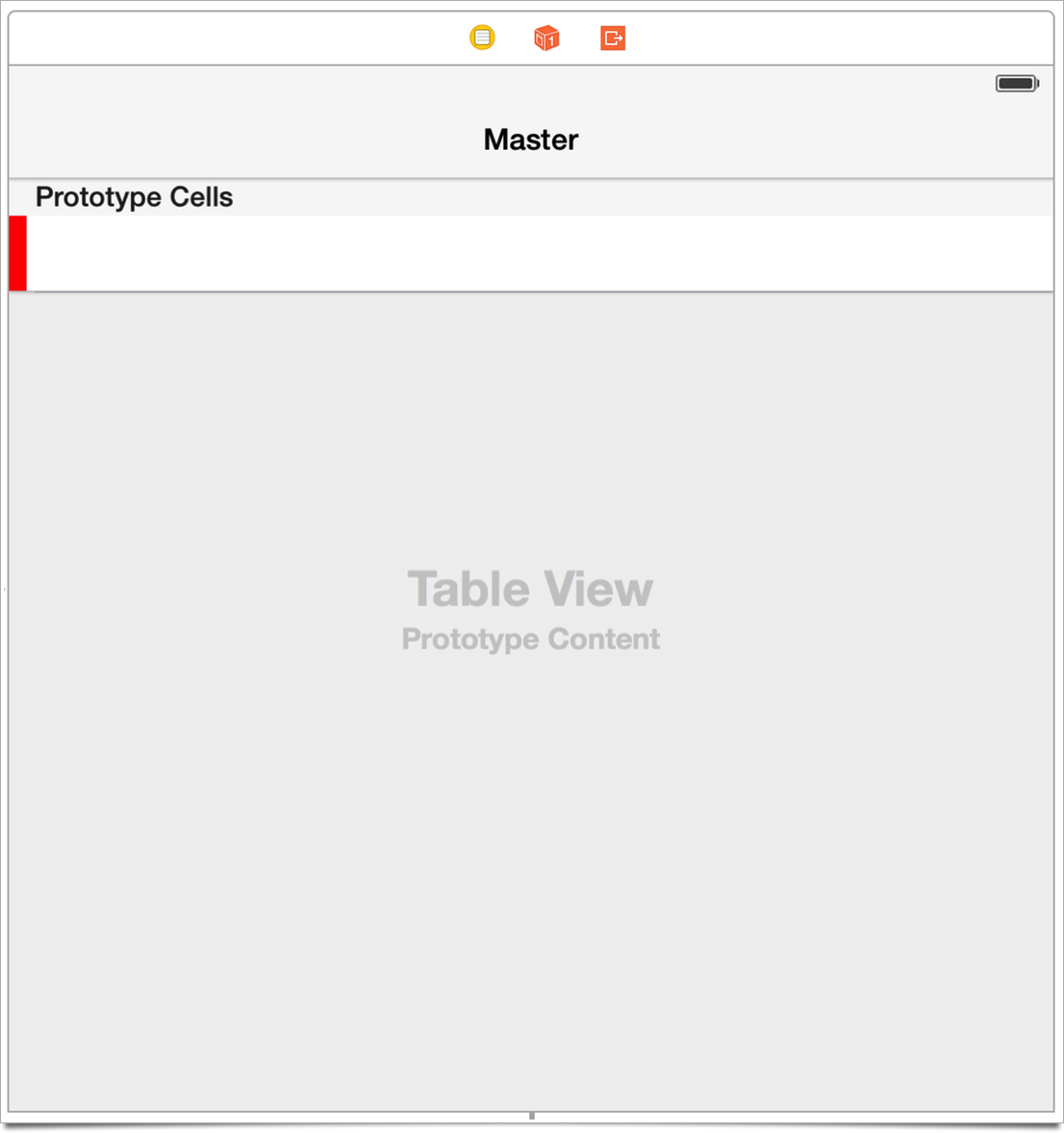
UITableView Storyboard


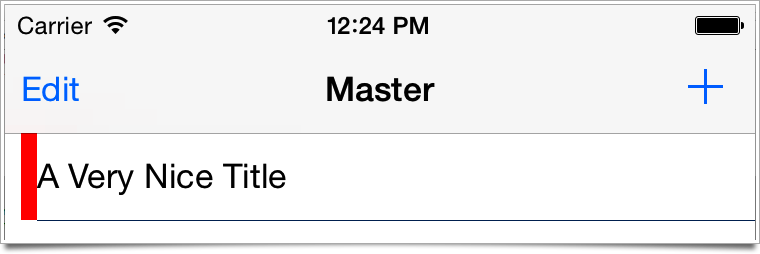
This is what you see in the app:

UITableView Insets

Notice the left hand margin? There is no option you can change in the Storyboard to fix it, you just get an indent/margin/inset you didn’t ask for. The storyboard doesn’t show this, so I’m not sure if this is a bug in the Storyboard editor, or in runtime in UITableView.

What’s happened is that I added a few AutoLayout constraints to the left red bar (margins t: -8, l: -8, b: -9).

When I do this, the tableView.layoutMargins appear to be their default value of 8. It looks like without AutoLayout, UITableView resets layoutMargins to UIEdgeInsetsZero, but with AutoLayout, it either wants the default margins or there’s a bug.

You have to add the following code to fix the pre-cell tableView display:

override func viewDidLoad() {

    super.viewDidLoad()


    self.tableView.separatorInset = UIEdgeInsetsZero

    self.tableView.layoutMargins = UIEdgeInsetsZero

But that’s not enough to get the cells looking right. Based in part on this StackOverflow post, but with my own testing, you have to implement the delegate callback willDisplayCell like this:

override func tableView(tableView: UITableView, willDisplayCell cell: UITableViewCell, forRowAtIndexPath indexPath: NSIndexPath) {

    cell.layoutMargins = UIEdgeInsetsZero

}

Why do we have to set layoutMargins again in willDisplayCell? Apparently the cell’s layoutMargins get reset again right UITableView decides where to draw the separator line, so you have to make them whatever you want. Curiously, willDisplayCell has existed since iOS 2, but I don’t remember needing to use it before iOS 8.

Now we get what we want.
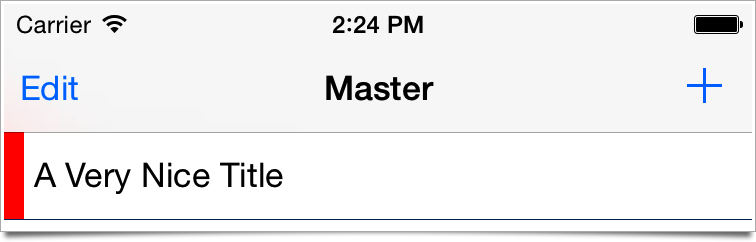
UITableView Insets fixed

Another Workaround That’s Incomplete...

This other StackOverflow post mentions the UIView property preservesSuperviewLayoutMargins. It defaults to NO/false, but for a UITableViewCell is set to YES/true.

You could have mostly solved the problem by explicitly setting that property to NO/false, but it would not have fixed the separator issue.

iOS 9 Beta 

I haven’t run through this on iOS 9 beta, so I don’t know what the the default indent situation is there.

Friday, July 10, 2015

Change the Global Tint in an Xcode Storyboard

TL;DR Look at the File Inspector tab (the one with the blank document) of your storyboard

Whenever I go looking for the Global Tint defined in the main storyboard in Xcode, there’s always a moment of cognitive dissonance.

My problem is that I go looking for some kind of Window object, which of course is how you’d do it programmatically (in Swift):

UIApplication.sharedApplication().delegate?.window!!.tintColor = UIColor.redColor()

The double !! after window is not a typo according to Xcode, though it sure looks weird.

Anyway, I guess nobody wants to make UIWindows things in Storyboards, so this property is stashed under the File Inspector tab!

Friday, June 12, 2015

GitHub is Not Your Resume

Your resume is your resume. 

Your released apps are your resume. 

Your released sites are your resume. 

Your published blog posts are your resume.

Your contributions to widely used open source software, some of which might be hosted on GitHub, are your resume. 

Your public repo that you're the sole contributor to and isn't a shipping product is not your resume

Hiring managers screening applicants don't have time to pull 3+ repos, attempt to compile them, and then read the source to see what a 10x dev/rockstar/ninja/special snowflake you are.
 

Thursday, May 14, 2015

Thursday, May 07, 2015

Cocoapods use_frameworks! Means A Bridging Header Not Required for Objective-C Pods in Swift

TL;DR Use standard "Import Framework" in Swift instead of the Obj-C bridging header for Obj-C Cocoapods with use_frameworks! in your Pods file
Versions: OS X  10.10.3 Xcode 6.3.1 iOS SDK 8.3  Cocoapods 0.36.1

This just wasn't obvious at all. I've been using Swift & Cocoapods < 0.36 since Xcode 6 shipped. While versions < 0.36 did not work with a Swift framework like Alamofire, you could use Objective-C pods and let them get compiled as a static library as long as you used the Objective-C bridging header to import the header(s).

With Cocoapods 0.36 and above, you can have Swift frameworks as Pods. To make that work, you have to put the use_frameworks! keyword in your Pods file. My brain misunderstood Use frameworks instead of static libraries for Pods because it automatically inserted for Swift before the Pods in that sentence. 

Took me a couple hours this morning to work out all my Pods might be framworks. I'm not the first person to figure it out, just a few days ago, Johannes Luderschmidt published a blog post with the solution which put on the right path. All Pods using use_frameworks! are frameworks, not just the Swift pods. A problem like this is where experience with Xcode can really work against you. You start tweaking Header Search Paths,  Framework Search Paths, User Header Search Paths, and the Always Search User Paths (docs: disabling it is strongly recommended) settings in desperation because that's usually where these problems lie. Especially when the first compiler error in your project after putting use_frameworks! in your Pod file is that the header for come Objective-C pod can’t be found.

But that’s totally down the wrong rabbit hole. I’m using the Obj-C MBProgressHUD Pod. What you need to do is:

  1. Remove the #imports from your bridging header
  2. Add Import MBProgressHUD into every Swift file that needs the class.
  3. Fix the enums

You're now using bona fide frameworks, so your enums have moved in flight! You might have a line of Swift that was fine with the bridging header like this:

progressHUD.mode = MBProgressHUDModeIndeterminate

That now has to become this:

progressHUD.mode = MBProgressHUDMode.Indeterminate

Not to big a deal, but the pile of errors might lead you astray that you have a bigger problem than you do if you’re using a lot of Obj-C enums.